How To Run Your 1:1 in Clari
Overview
As a manager, your 1:1 is an opportunity for you to coach your reps to make them (and ultimately you!) more successful.
Unfortunately, these sessions can easily become a game of 20 questions, where the manager interrogates his or her rep to get the play-by-play of every deal. That's a waste of the rep's time, and only (maybe) helps the manager report more accurately up the leadership chain.
This article will walk you through some of the best practices we've seen for running your 1:1 and how you can leverage Clari to facilitate the conversation and get key insights for a more effective discussion.
5 tips for better 1-on-1s in Clari
1) Set a schedule, frequency, and duration, and stick to it!
Consistency will help drive accountability. If you as a manager have your 1:1s every Friday, it's easy to communicate to your reps that they need to update their deals and forecast by 6pm on Thursday in preparation for their 1:1s.
2) Do your research and come prepared.
If you ask your reps to update their deals and forecast by 6pm on Thursday, and then ask them to verbally tell you everything they put in the Next Steps field, you're doing it wrong. Take the time to review their updates and know exactly what deals you want to talk about.
3) Define a clear agenda.
Your agenda will shift depending on where you are in the quarter, but it's important to communicate what you'd like to discuss with your reps so they can come prepared.
4) Leverage Analyze to ask the right questions.
Clari shows you insights to help validate and pressure test deals. For example, you'll see what changed, what emails / files have been sent, what meetings have happened, and which deals are at risk. Use those insights to help drive a focused conversation around areas where you can help.
5) Do not interrogate - provide guidance and coaching.
This 1-on-1 is your opportunity to help your rep, and for your rep to get help from you. It should be a productive conversation where you come out with clear action items that will help get deals closed.
Streamline Your 1:1s with Revenue Cadences
Clari's Revenue Cadences feature helps you operationalize your team's rhythm by creating "moments" that guide your team to focus on the right activities at the right time. A "moment" is an internal sales activity designed to drive alignment, operational rigor, and execution of your overall revenue cadence.
1:1 Moments: Private and Personalized Coaching
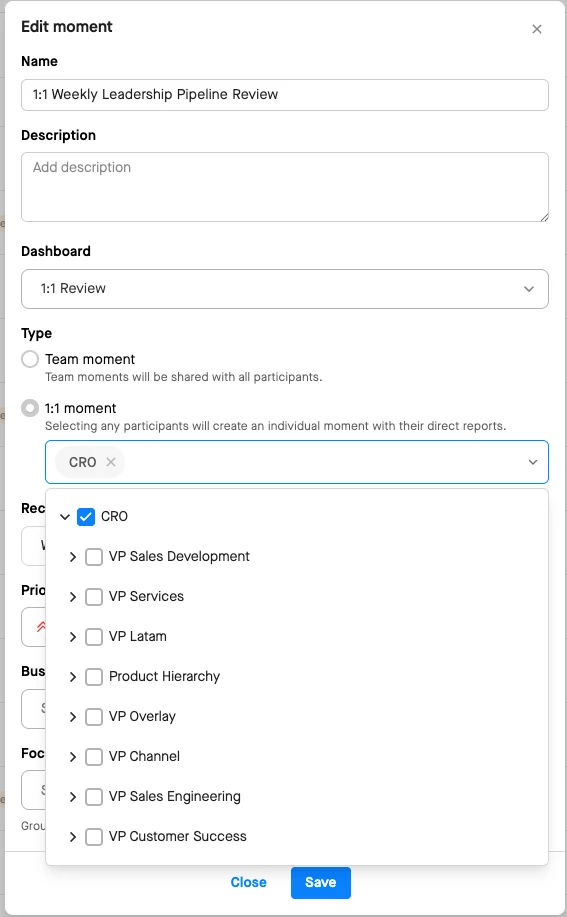
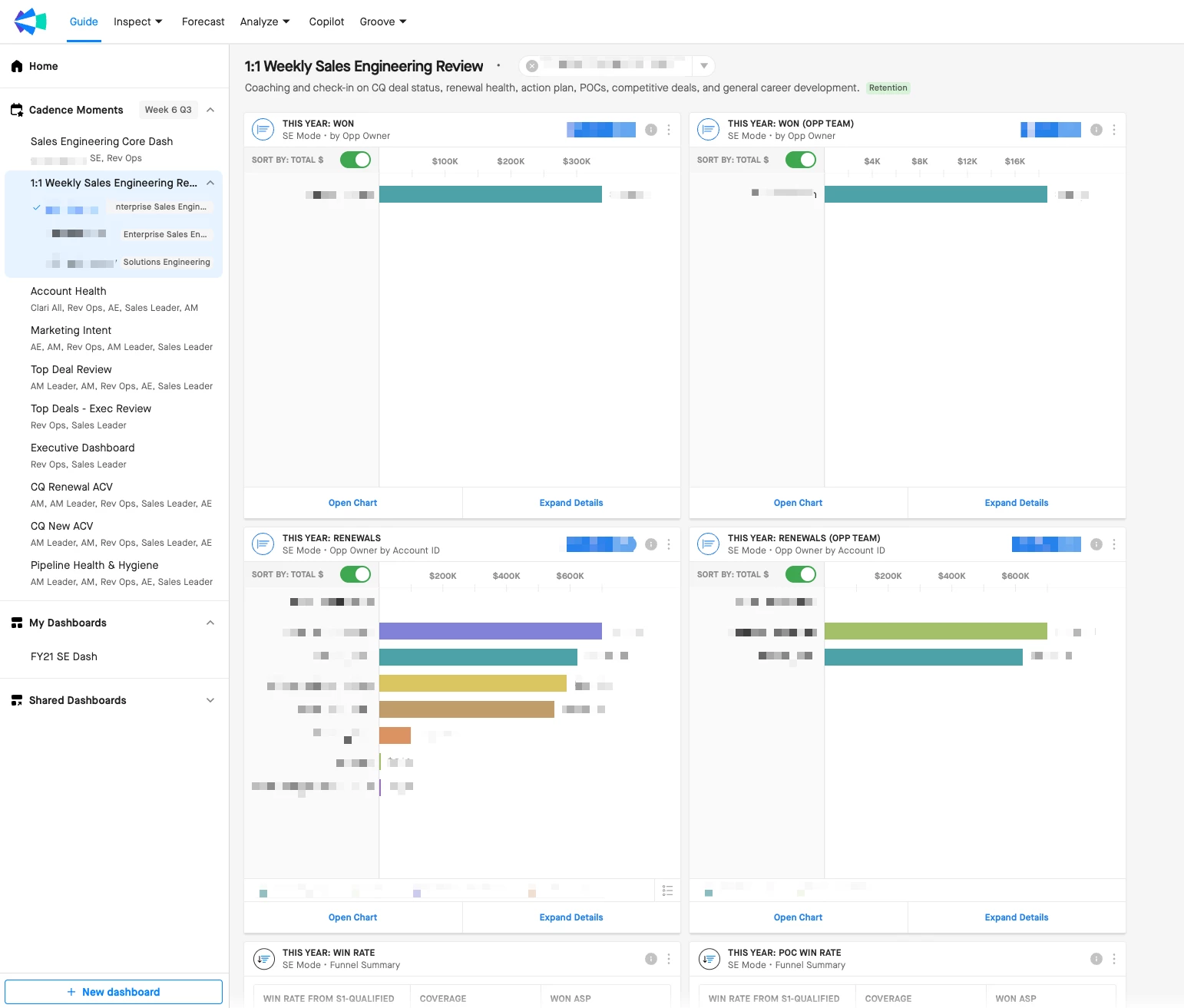
A 1:1 moment is a private space specifically for activities between a manager and their direct report(s). This moment is private between these two participants, and only visible to them.
- Best For: Weekly or bi-weekly check-ins to discuss current quarter focus, pipeline generation, deal coaching, identifying risk areas, and developing action plans.
- How it Works: Admins can select a node in the organizational hierarchy (e.g., all VPs) and the system automatically infers the manager-report relationships. The moment is then scoped to the report's data, which is a major benefit as it automatically updates when reporting structures change.
- Goal: Facilitate a high-impact coaching session where reps can strategize deals, inspect for risk, and execute with confidence.
Team Moments: Shared Insights for Group Alignment
A Team Moment is a shared moment designed for activities involving a group of users, roles, or a team within the hierarchy. Unlike 1:1 moments, the data and content in a team moment are shared with all participants. The data in a team moment is not private between a manager and report - it is shared with all Moment participants.
- Best For: Group activities like weekly forecast calls, pipeline reviews, or quarterly business reviews (QBRs) where everyone needs to see the same content and align on a shared goal.
- How it Works: Admins must manually add each participant by name or role, ensuring everyone who needs to collaborate has access to the content.
- Goal: Drive better performance across and within teams by providing a single source of truth for key insights and fostering alignment on shared objectives.
Key Takeaway:
The distinction between these two moment types allows you to tailor your revenue cadences precisely to your team's needs. You can create private, focused coaching sessions for individual performance and collaborative, transparent meetings for team-wide alignment, all within a single platform. This helps eliminate manual prep work and ensures every minute is spent on strategy and execution
How to run your 1:1 in Clari
Step 1. Prepare - How are your reps doing?
If you have the Clari Forecast module and you're following along, we're going to start there.
Key Questions Answered in the Forecast Module:
- How are your reps tracking against their quotas and forecast calls?
- Do they have enough coverage?
- What deals are backing up the call?
How are your reps tracking against their quotas and forecast calls?
From the Forecast module, you can tell what your reps have closed ("Booked")(1), and if you click on the closed amount, you can see their gap-to-goal (2) in the side panel.

Do they have enough coverage to close their gap-to-goal?
If you click on a forecast call (3), you'll see the details on the right-hand panel for that specific call. Your forecast set-up will be different than the example here, but in general, you'll see the opportunities that should in theory support that call. Hover your mouse over the i next to Opportunities to see the exact details of what deals are being displayed.

What deals are backing up the call?
Navigation: With your rep's call field selected, go to the Forecast Expanded View by clicking "Expand Details" in the Forecast side panel.

Inspection: Use the expanded grid to get deeper visibility into the CRM fields related to the individual deals that are supporting the call. You can select any deal to view the deal insights in the side panel.

Here we are looking at all of the deals supporting our commit call and are examining the Security Upgrade deal.
Let's consider a few scenarios
Rep #1 - Serena Williams
- Quota = $1,000,000
- Closed = $100,000
- Gap-to-Goal - $900,000
- Rep Forecast = $800,000
- Forecast-to-Go = $700,000
- Value of Commit deals in Salesforce = $150,000
- Value of Best Case deals in Salesforce = $1,500,000
Serena has barely anything in Commit, but she's loaded with Best Case $$. Serena's manager should recognize this, and help Serena focus on validating and accelerating her Best Case deals.
Rep #2 - Tiger Woods
- Quota = $1,000,000
- Closed = $50,000
- Gap-to-Goal - $950,000
- Rep Forecast = $700,000
- Forecast-to-Go = $650,000
- Value of Commit deals in Salesforce = $60,000
- Value of Best Case deals in Salesforce = $200,000
Tiger has to close $650,000 to meet his Forecast, but he only has a total of $260,000 worth of Commit and Best Case deals. So...how on earth is he going to hit $700,000? Sounds like a good conversation topic for your 1:1.
Once you know what your reps are Forecast and roughly if they're on track to hit their forecasts based on coverage, it's time to inspect the deals.
Key Questions Answered in Forecast Expanded View
- What deals are at risk?
- Where can I help?
Select a Saved View that will show you all of the deals closing this quarter (4). Add a group for Owner (5) and Forecast (6).

If your first 1-on-1 is with Michael Anderson, select his name (7) and the values in the Forecast group will automatically adjust (8). Select Commit to see just Michael's Commit deals. Hover your mouse over the first opportunity name and click the i (9) to open the Details panel.

Between the colored highlighting and the information in the Insights panel, you're armed with the right data to get a realistic picture of what's happening in a deal without even talking to the owner.
A couple of tips—
- Leverage the colored highlighting in the grid to see what's changed recently. Did a deal recently push? Did the deal size increase? Did the Forecast change from Commit to Best Case?
- Inspect the CRM Score to see how likely the deal is going to be closed as won based on historical CRM data and patterns. Hover your mouse over the score to see the top three factors that are influencing the score. You may see the deal has been in Commit for 317 days, or that the deal moved from Stage 5 to Stage 3.
- Check the health of the activity. Are there emails and files being sent back and forth? Have there been meetings, and is there an upcoming meeting? You can even see the metadata of the interactions when you hover over the circles. There's no faster way to tell if the prospect has gone dark or if they are already in red lines.
Let's consider a few deal examples—
1) Americas Expansion for Chromos Global
Americas Expansion has a CRM score of 93, which is looking good. There's a ton of activity going back and forth between Michael and Chromos - I see there are files being exchanged (10), and there's a next meeting scheduled (11).

When I navigate to Relationships (12), I can see who we are engaged with on the Americas Expansion deal and confirm that we have the right people engaged for the stage that this deal is in.

When I go over to Details (13), I see he's following the MEDDIC methodology and everything looks on track. We probably don't need to review this deal in our meeting.

2) IT Storage Upgrade - Rainbow Storage
IT Storage Upgrade has score of 46. Based on the factors contributing to the score, I see the close date was pushed out, and it's been in Commit for way too long. On top of that, looks like Rainbow Services totally went dark, and we haven't heard from them or met with them in the last 6 weeks.

If I look at MEDDIC, I do see we have a champion, so maybe we can run a play with this guy.
I'm going to star this deal to remember to talk about it.

For the sake of not boring you, I won't inspect any more deals in this article, but you get the idea. You can easily see what's happening with each deal without spending the bulk of your 1:1 asking for status updates.
Now you're ready for your actual 1:1.
Step 2. Run your 1-on-1
If you think back to our tips, remember that #3 says define a clear agenda.
Well, here's an example for you:
- Review current quarter forecast
- Current quarter top deal review
- Next quarter outlook
So start in the forecast module, and talk to your rep about what he / she is calling for the quarter, and his / her plan of action to get there.
When you start reviewing the current quarter top deals, go to the Opportunities module with the same groups you used to prepare for your 1-on-1s. Focus on how you can help your rep. Is there a play you can run with the champion? Are there resources you can direct your rep to?
And for next quarter? Just select a Saved View to see all of your deals set to close next quarter, and add your same groups for Owner and Forecast.
Summary
Running effective 1:1s in Clari is about preparation, focus, and coaching. By leveraging Clari's insights and features like Revenue Cadences, you can transform your 1:1s from status update meetings into high-impact coaching sessions that drive results. Remember to come prepared, use data to guide your conversations, and focus on providing actionable guidance that helps your reps succeed.
